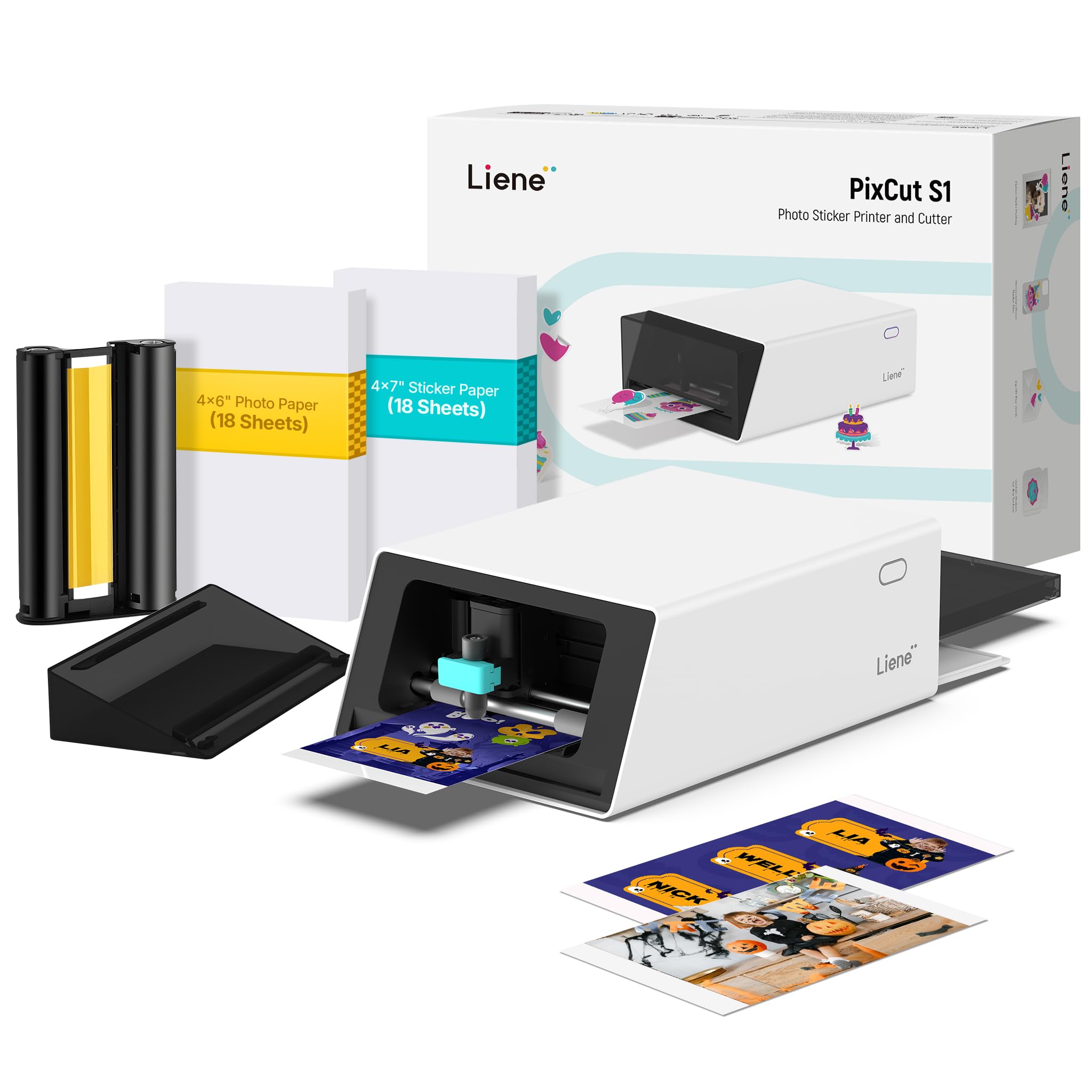
The Liene PixCut S1 combines color photo printing and sticker cutting in one compact device, with app tools for creating custom designs.
This Liene PixCut S1 Color Sticker Printer & Cutting Machine review looks at how its dye-sublimation printing, automated cutting, and template library fit craft and label projects.
Liene PixCut S1 Review Summary
The quick verdict
700+ ratings
Read Amazon ReviewsLiene PixCut S1
A compact choice for crafters who want to print and cut custom color stickers from a phone, tablet, or desktop app.
- All-in-one thermal dye-sublimation printer and cutting machine for custom color stickers, labels, and craft projects.
- 300 dpi color printing with a palette of 16.7 million colors.
- AI image extraction identifies and separates subjects from photos to prepare them for cutting.
- Bluetooth connection and app-based editing, printing, and cutting from a smartphone; the app is also available on tablet and desktop.

Pros
- Combines printing and cutting in one device, keeping the basic sticker workflow together.
- AI subject extraction can help turn a photo into a cutout design without tracing its edges by hand.
Consider before buying
- The workflow depends on Liene’s app, so buyers should confirm that their preferred device and design habits fit its tools.
- The description focuses on stickers and small custom projects; check supported media and project dimensions if you need a particular format or larger output.
Read the full review summary
The PixCut S1 is designed to simplify small custom-print projects: create or edit an image in the Liene app, send it over Bluetooth from a mobile device, and let the machine print and cut in one workflow.
Its 300 dpi dye-sublimation output, automatic lamination, and AI-assisted image extraction make it especially appealing for photo stickers, decorative labels, and personalized gifts.
At 11 by 7.7 by 4.1 inches and 6.2 pounds, it is a desktop craft machine rather than a full-size production cutter.
The broad template and asset library may help beginners get started, while the combination of printing and cutting reduces the need to coordinate separate devices.
Buyers should still consider the maker’s intended media, project sizes, and app workflow before relying on it for a particular recurring job.
The buying factors
Liene PixCut S1 Scorecard
Editorial scores reflect listed features and buyer fit; they are not laboratory measurements or customer ratings.
Print-and-cut workflow
Printing and cutting are integrated, with smartphone editing and Bluetooth sending described as part of the process.
Color print detail
The 300 dpi dye-sublimation system is positioned for vivid photos, stickers, and labels.
Design assistance
AI subject extraction and style tools can reduce manual work when preparing images.
Creative resources
The app includes more than 50,000 free images, fonts, and elements plus over 10,000 templates.
Sticker finish
Four-layer dye-sublimation printing automatically laminates the paper, and the resulting stickers are described as waterproof and scratch-resistant.
Project flexibility
Features cover stickers, labels, phone skins, lens stickers, ID cards, badges, and other small custom items, though the device is oriented toward desktop crafts.
Key Features and Specifications of Liene PixCut S1
- All-in-one thermal dye-sublimation printer and cutting machine for custom color stickers, labels, and craft projects.
- 300 dpi color printing with a palette of 16.7 million colors.
- AI image extraction identifies and separates subjects from photos to prepare them for cutting.
- Bluetooth connection and app-based editing, printing, and cutting from a smartphone; the app is also available on tablet and desktop.
- Four-layer printing process automatically laminates the paper; finished stickers are described as waterproof and scratch-resistant.
- App library includes 50,000+ free images, fonts, and elements and 10,000+ templates, with no subscription required.
- Measures 11 by 7.7 by 4.1 inches and weighs 6.2 pounds.
Pros and Cons of Liene PixCut S1
Pros
- Combines printing and cutting in one device, keeping the basic sticker workflow together.
- AI subject extraction can help turn a photo into a cutout design without tracing its edges by hand.
- Dye-sublimation output and automatic lamination suit colorful, finished-looking stickers.
- The included design library and templates provide a substantial starting point without a subscription.
- The listed footprint and weight are manageable for a dedicated desktop craft area.
Consider before buying
- The workflow depends on Liene’s app, so buyers should confirm that their preferred device and design habits fit its tools.
- The description focuses on stickers and small custom projects; check supported media and project dimensions if you need a particular format or larger output.
- The all-in-one setup is specialized for creative printing and cutting, so it may be more machine than needed for occasional plain labels.
Who Should Buy Liene PixCut S1?
Good fit
Consider the PixCut S1 if you regularly make personalized stickers, decorative labels, or small gifts and want printing and cutting handled in one device.
The AI extraction feature is particularly relevant when your designs start as photos or other images with irregular outlines.
It may also suit a beginner who wants ready-made templates and a large pool of app assets to explore.
Before buying, make a short list of the projects you expect to produce and check that the machine’s supported materials and working area match them.
Who should skip it
Look elsewhere if your main need is a general-purpose office printer, large-format output, or a standalone cutting machine for materials beyond the paper projects described here. The PixCut S1 is built around producing printed custom items.
If you prefer to create designs entirely in a separate desktop program, first check whether the Liene app workflow supports the way you prepare and send artwork.
How the Liene PixCut S1 fits a craft workflow
One path from image to sticker
Combining the printer and cutter can make a compact workflow easier to manage: edit an image in the app, send it to the device, and produce a cut sticker.
That integration is most useful for repeat projects where a printed image needs a shaped edge, rather than for print jobs that end at the page.
AI tools for irregular designs
Subject extraction is aimed at isolating the person or object in a photo, while the cutting system follows the extracted outline.
This could be useful for portraits, character art, or decorative motifs that would take extra work to trace manually. Buyers who need exact layout control should explore the available editing tools before choosing it for production work.
A color process for finished pieces
Dye-sublimation printing is specified at 300 dpi and 16.7 million colors, and the four-layer process laminates the paper during printing. The design is therefore oriented toward polished, colorful craft outputs.
The stated waterproof and scratch-resistant qualities may suit items that are handled, though the description does not define conditions or expected service life.
A sizable app resource library
The templates and free design assets can shorten the time between opening the device and making a first project. Templates are listed for items such as phone skins, ID cards, labels, and name tags.
This breadth supports experimentation, while the app remains a central part of the device’s stated workflow.
Alternatives to Liene PixCut S1
No alternative model is recommended here. Compare the design workflow, supported materials, and output dimensions that matter to your routine before choosing another option.
Is Liene PixCut S1 Worth It?
The Liene PixCut S1 is worth considering for crafters who want a single desktop machine to print and cut colorful custom stickers.
Its combination of dye-sublimation printing, AI-assisted image preparation, automatic lamination, and a large app library gives it a clear purpose for personalized projects.
Buy it when that integrated workflow matches the projects you make and the Liene app suits your process.
Check the supported media and working area first if you have specific size or material requirements; for occasional basic labels or broader printing needs, its craft-focused design may not be the best fit.
Your review at a glance
700+ ratings
Read Amazon ReviewsLiene PixCut S1
A compact choice for crafters who want to print and cut custom color stickers from a phone, tablet, or desktop app.
- All-in-one thermal dye-sublimation printer and cutting machine for custom color stickers, labels, and craft projects.
- 300 dpi color printing with a palette of 16.7 million colors.
- AI image extraction identifies and separates subjects from photos to prepare them for cutting.
- Bluetooth connection and app-based editing, printing, and cutting from a smartphone; the app is also available on tablet and desktop.